



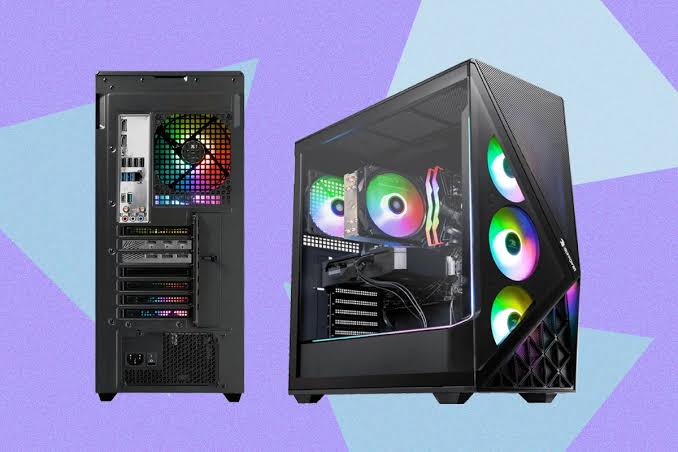
iBUYPOWER is one of the most popular gaming PC brands in the United States. Walk into Best Buy, browse Amazon, or search for prebuilt gaming PCs online, and you’ll almost certainly come across an iBUYPOWER system. The company has built thousands of gaming desktops over the past two decades and has become a favorite among gamers looking for a ready-to-play PC without the hassle of building one themselves.
But popularity doesn’t always mean quality. Some gamers praise iBUYPOWER for offering excellent performance at competitive prices, while others report mixed experiences with customer support and occasional quality control issues. So, are iBUYPOWER gaming PCs actually worth buying in 2026?
In this review, we’ll examine the company’s reputation, reliability, gaming performance, upgradeability, customer service, warranty coverage, and real customer feedback to help you decide whether an iBUYPOWER desktop deserves a place on your desk.
If you’re not really looking for a gaming desktop, check out some of the best gaming laptops for 2026 in this review.
About iBuypower
Founded in 1999, iBUYPOWER has been building gaming PCs for more than two decades. The company specializes in custom-built and preconfigured gaming desktops designed for everyone from casual gamers to esports enthusiasts. Today, iBUYPOWER partners with major hardware manufacturers including NVIDIA, AMD, Intel, ASUS, and MSI to create systems covering virtually every price range.
Unlike many budget prebuilt manufacturers, iBUYPOWER offers both ready-to-ship systems and highly customizable configurations. Buyers can choose specific CPUs, graphics cards, cooling systems, storage options, and case designs directly through the company’s website.
The brand is particularly well-known for delivering aggressive pricing during sales events, making it a common recommendation for gamers who want strong performance without building a PC from scratch.
Variety of Hardware Options
One of iBUYPOWER’s biggest strengths is the sheer variety of hardware combinations available. Unlike some prebuilt brands that focus primarily on one platform, iBUYPOWER offers gaming PCs powered by both Intel Core and AMD Ryzen processors, paired with either NVIDIA GeForce RTX or AMD Radeon RX graphics cards. Buyers can choose from budget-friendly 1080p gaming systems, high-refresh-rate esports PCs, powerful 1440p gaming rigs, and enthusiast-level 4K machines depending on their needs and budget. iBUYPOWER’s custom configurator also allows customers to mix and match components, making it easy to build a system around their preferred CPU and GPU ecosystem.
Whether you prefer an Intel + NVIDIA combination, an AMD Ryzen + Radeon setup, or a Ryzen processor paired with an RTX graphics card, iBUYPOWER offers configurations for virtually every type of gamer. This flexibility is one reason the brand remains popular among first-time buyers and experienced enthusiasts alike.
| Category | Score |
|---|---|
| Gaming Performance | 9/10 |
| Value for Money | 8.5/10 |
| Build Quality | 8/10 |
| Upgradeability | 8.5/10 |
| Reliability | 8/10 |
| Customer Support | 7/10 |
| Overall Score | 8.2/10 |
Pros
- Strong gaming performance
- Wide range of configurations
- Frequently discounted
- Good component selection
- Easy upgrade paths
- Available through major retailers
Cons
- Quality control can vary
- Customer support receives mixed reviews
- Some entry-level systems use lower-end components
- Shipping damage occasionally reported
Are iBUYPOWER PCs Good for Gaming?
For gaming performance, iBUYPOWER is generally one of the safer choices among mainstream prebuilt brands.
The company uses standard off-the-shelf components from manufacturers such as NVIDIA, AMD, Intel, ASUS, MSI, Gigabyte, Kingston, and Western Digital. Because of this, gaming performance is usually determined by the hardware configuration rather than the brand itself.
Recent reviews have praised models such as the RDY Slate series for delivering excellent 1440p gaming performance with modern GPUs while maintaining clean cable management and minimal software bloat. Reviewers also noted that the systems generally arrive ready to game right out of the box.
For most gamers, an iBUYPOWER desktop performs exactly as expected. A system equipped with an RTX 5060, RTX 5070, or RTX 5070 Ti will perform similarly to competing desktops using the same graphics card.
Why Are iBUYPOWER PCs So Popular?
One of iBUYPOWER’s biggest strengths is pricing.
The company frequently offers sales that place its systems among the most competitively priced gaming desktops on the market. Industry reviewers have regularly highlighted iBUYPOWER systems as strong value options in the prebuilt gaming PC space.
Another reason for the brand’s popularity is availability. Unlike boutique builders that sell only through their own websites, iBUYPOWER systems can be purchased through major retailers, giving buyers more options for returns, financing, and extended warranties.
How Reliable Are iBUYPOWER PCs?
Reliability is generally good but not perfect.
Most owners report years of trouble-free gaming, largely because the company uses standard PC hardware from established manufacturers. However, like many mass-produced prebuilt brands, occasional quality-control issues can occur.
Common complaints typically involve:
- Faulty AIO coolers
- Shipping damage
- Loose internal cables
- Dead-on-arrival components
- Fan or RGB issues
The good news is that these problems are not unique to iBUYPOWER. Similar complaints can be found for CyberPowerPC, Skytech, Alienware, and other major prebuilt brands.
Reliability Score: 8/10
Most systems perform well long-term, but buyers should inspect their PCs carefully after delivery.
What Real iBUYPOWER Owners Say
Customer feedback on iBUYPOWER is mixed but generally leans positive.
Many long-term owners report purchasing multiple systems over several years without significant issues. Several Reddit users describe owning multiple iBUYPOWER PCs over a decade while experiencing few major hardware problems.
On the other hand, some users report frustrating warranty experiences, shipping costs during repairs, and slow support responses when hardware problems occur. Several discussions mention issues involving defective coolers, GPUs, or warranty claims.
The overall takeaway is that customer satisfaction tends to be very high when the PC arrives functioning properly, but support experiences can vary when repairs are needed.
iBUYPOWER Warranty and Customer Support
Warranty coverage is one area where iBUYPOWER has improved significantly.
New desktop systems purchased directly from iBUYPOWER now include up to three years of labor coverage and up to three years of parts coverage depending on purchase date and warranty package. The company also offers extended protection plans and a 60-day satisfaction guarantee on eligible systems purchased directly through its website.
The warranty is stronger than what many budget competitors offer, although customer experiences with the support process remain inconsistent according to online reviews.
Support Score: 7/10
Coverage is competitive, but actual support experiences can vary considerably.
Are iBUYPOWER PCs Easy to Upgrade?
Yes.
One advantage of iBUYPOWER systems is that most use standard ATX components rather than proprietary hardware. This makes future upgrades relatively straightforward.
Users can typically replace:
- Graphics cards
- RAM
- SSDs
- Power supplies
- Cooling systems
- Motherboards
This flexibility gives iBUYPOWER an advantage over brands like Alienware, which often use proprietary cases and motherboard layouts.
Upgradeability Score: 8.5/10
Most systems are beginner-friendly and remain upgradeable for years.
Best iBUYPOWER Gaming PCs by Use Case
| Use Case | Recommended Series |
|---|---|
| Best Overall | Y60 Series |
| Best Value | Slate Series |
| Best for 1440p Gaming | Trace Series |
| Best for 4K Gaming | Y70 Series |
| Best Budget Gaming PC | Scale Series |
| Best Esports Gaming PC | RDY Series |
| Best High-End Gaming PC | Element Series |
Final Verdict: Is iBUYPOWER Worth Buying?Is iBuypower A Good Brand?
Yes, for most gamers, iBUYPOWER is a solid choice.
The company combines competitive pricing, strong gaming performance, broad availability, and good upgradeability into a package that appeals to both beginners and experienced PC gamers. While customer support receives mixed feedback and quality control isn’t perfect, the overall value proposition remains strong.
If you’re shopping for a prebuilt gaming desktop and want reliable gaming performance without building your own PC, iBUYPOWER deserves a spot on your shortlist alongside CyberPowerPC, Skytech, and ABS.
Final Rating: 8.2/10
Recommended For: Gamers who want strong performance, good upgradeability, and competitive pricing.
Not Ideal For: Buyers who expect boutique-level customer support or extensive hand-testing before shipment.
Frequently Asked Questions (FAQs)
Is iBUYPOWER a Good Brand?
Yes. iBUYPOWER is generally considered one of the better mainstream prebuilt gaming PC brands. The company has been building gaming desktops since 1999 and offers systems ranging from entry-level gaming PCs to high-end enthusiast rigs. Most buyers praise the performance, upgradeability, and value for money, though customer support experiences can vary depending on the situation. Overall, iBUYPOWER is a solid choice for gamers who want a prebuilt PC without building one from scratch.
Is iBUYPOWER a Good Gaming PC?
Yes. iBUYPOWER gaming PCs use standard components from major manufacturers such as NVIDIA, AMD, Intel, MSI, ASUS, and Gigabyte. As a result, gaming performance is typically comparable to other prebuilt brands using the same hardware. Modern iBUYPOWER systems are capable of handling everything from esports titles at high refresh rates to demanding AAA games at 1440p and 4K resolutions.
Do iBUYPOWER Towers Have an SD Card Slot?
Most iBUYPOWER gaming desktops do not include a built-in SD card reader. Whether an SD card slot is available depends on the specific case and configuration purchased. If you regularly transfer photos or videos from cameras, you’ll likely need an external USB SD card reader.
Always check the product specifications before purchasing, as some specialty cases may include front-panel card readers while most gaming-focused models do not.
How Do You Update an iBUYPOWER BIOS?
Updating the BIOS on an iBUYPOWER desktop involves identifying your motherboard model, downloading the latest BIOS directly from the motherboard manufacturer’s website, placing the BIOS file on a USB flash drive, and using the motherboard’s built-in BIOS update utility such as ASUS EZ Flash, MSI M-Flash, Gigabyte Q-Flash, or ASRock Instant Flash. iBUYPOWER recommends avoiding unnecessary BIOS updates unless you’re solving a compatibility issue or specific problem.
Basic Steps:
- Identify your motherboard model.
- Download the latest BIOS from the manufacturer.
- Extract the BIOS file to a USB drive.
- Enter BIOS during startup.
- Launch the BIOS flash utility.
- Select the BIOS file and begin the update.
- Do not power off the system during the process.
How Do You Change Colors on an iBUYPOWER Keyboard?
The method depends on the keyboard model. Many stock iBUYPOWER keyboards use built-in keyboard shortcuts to cycle through colors, lighting effects, and brightness levels. Common shortcuts include combinations using the Fn key along with keys such as Ins, PrtSc, Scroll Lock, Page Up, or Page Down. Some users also control RGB lighting through software such as HYTE Nexus, motherboard RGB software, or third-party tools like SignalRGB.
For many iBUYPOWER keyboards:
- Fn + Ins = Change colors
- Fn + Scroll Lock = Change lighting modes
- Fn + Page Up/Page Down = Adjust brightness
- Fn + PrtSc = Turn lighting on or off
The exact shortcuts vary by keyboard model.
How Do You Remove an HDD Bay From an iBUYPOWER PC?
The process varies depending on the case used in your system. Most modern iBUYPOWER cases use removable drive cages that are secured with screws located underneath the power supply shroud or behind the motherboard tray.
In general:
- Power down and unplug the PC.
- Remove both side panels.
- Locate the hard drive cage.
- Remove the retaining screws.
- Slide the cage out of the case.
Because iBUYPOWER uses several different case designs, it’s a good idea to consult your case manual before attempting removal. If you’re upgrading to additional SSD storage, many newer systems allow the HDD cage to be removed entirely to improve airflow.
Are iBUYPOWER PCs Easy to Upgrade?
Yes. One of the biggest advantages of iBUYPOWER desktops is that they use standard off-the-shelf PC components rather than proprietary hardware. Most users can upgrade the graphics card, RAM, SSD, power supply, cooling system, and even the motherboard without major compatibility issues. This makes iBUYPOWER systems more upgrade-friendly than many OEM desktops from Dell or HP.
How Long Do iBUYPOWER PCs Last?
With proper maintenance, an iBUYPOWER gaming PC can easily last 5–8 years or more. Most users upgrade components such as the graphics card or storage long before the entire system needs replacement. Since the company uses standard retail hardware, replacing aging components is usually straightforward and cost-effective.


