



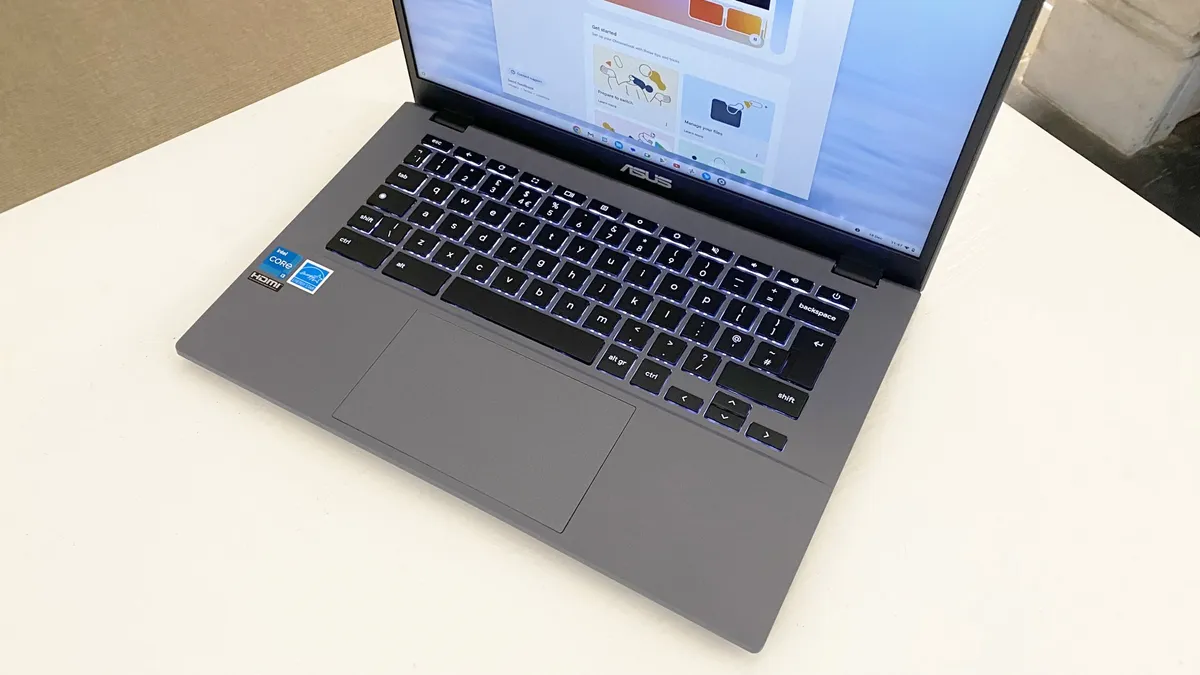
Asus Chromebook Plus CX34 (CX3402CBA-DH386-WH) Review: Best Budget Clamshell Chromebook
The Asus Chromebook Plus CX34 (CX3402CBA-DH386-WH) proves that a budget Chromebook doesn’t have to feel cheap. Asus has refreshed the CX34 with faster hardware, solid everyday usability, and one of the better keyboard-and-touchpad combinations you’ll find at this price point. For students, remote workers, and casual users who live primarily in the browser, this Chromebook delivers excellent value without unnecessary extras.
Pros
- Simple clean design
- Impressive CPU performance
- Pleasant keyboard and touchpad
- Plenty of ports to connect to
Cons
- A bit of flex to the chassis
- Basic 1080p display easily outclassed for not much more
- Long all-day battery
About the Asus Chromebook Plus CX34 Laptop
The Asus Chromebook Plus CX34 is one of the strongest budget Chromebook options currently available. Rather than completely redesigning the laptop, Asus focused on refining the experience with practical improvements that make the CX34 feel more polished and capable for everyday use. The result is a Chromebook that balances affordability, performance, and usability exceptionally well.
The model we tested comes equipped with an Intel Core i3-1215U processor, paired with 8GB of RAM and 128GB of UFS storage. While the Core i3 chip is not the newest processor in Intel’s lineup, it still delivers noticeably better performance than the MediaTek and Intel Celeron processors commonly found in cheaper Chromebooks. Everyday tasks like web browsing, streaming, schoolwork, video conferencing, and multitasking across multiple tabs feel smooth and responsive.
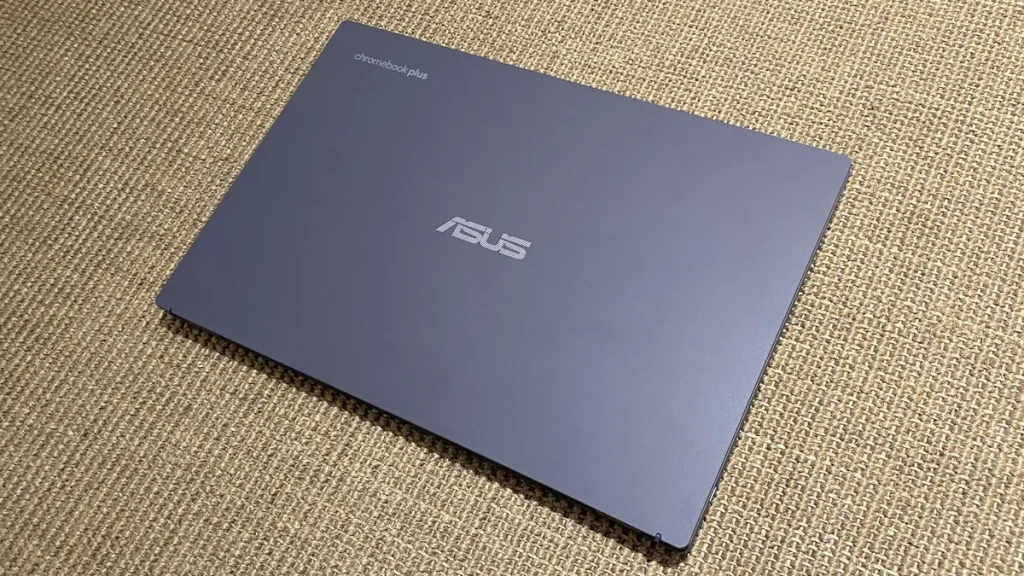
The 8GB of memory is another major advantage in this price range. Before Google introduced the Chromebook Plus standard, many affordable Chromebooks were still limited to 4GB of RAM, which could quickly become restrictive during heavier multitasking. Here, the extra memory helps ChromeOS run far more comfortably, especially when using Android apps or juggling several browser windows at once.
Storage is handled by a 128GB UFS drive. Unlike traditional eMMC storage often used in low-cost Chromebooks, UFS storage offers faster responsiveness and better efficiency. It’s a storage technology commonly used in smartphones and tablets, designed to balance speed with low power consumption. While it’s still not as fast as a full NVMe SSD, it provides a noticeably snappier experience than older budget Chromebook storage solutions.
Configurations
One of the nice things about the Chromebook Plus CX34 lineup is the variety of configurations available. Asus offers several versions of the laptop, starting with affordable Core i3 models like our review unit and scaling up to more premium configurations aimed at power users. Higher-end variants can include Intel Core i5 or Core i7 processors, up to 16GB of RAM, and larger 256GB or 512GB SSD storage options. Those upgraded models compete more directly with premium ChromeOS laptops, offering extra headroom for demanding multitasking and heavier workloads.
ChromeOS continues to be one of the laptop’s biggest strengths. Google’s Docs, Sheets, and Slides apps are integrated directly into the operating system and can even function offline when needed. Syncing with Google Drive happens seamlessly in the background, making file management incredibly simple across multiple devices. Google also includes useful built-in video call enhancements like background blur and noise cancellation, features that work system-wide across most conferencing apps.
The Chromebook Plus CX34 also supports Android apps through the Google Play Store, giving users access to a huge library of mobile applications beyond standard web-based tools. Thanks to the touchscreen display, interacting with Android apps feels far more natural and convenient than on traditional non-touch Chromebooks.
While Google markets Chromebook Plus devices with a strong focus on AI-powered features, most of those tools are software-driven rather than dependent on dedicated AI hardware. In practical day-to-day use, the CX34 succeeds because it’s a fast, reliable, and well-rounded Chromebook first—not because of flashy AI branding.
Asus Chromebook Plus CX34 Specs
| Class | Chromebook |
| Processor | Intel® Core™ i3-1215U |
| RAM (as Tested) | 8 GB |
| Boot Drive Type | SSD |
| Boot Drive Capacity (as Tested) | 256 GB UFS |
| Screen Size | 14 inches |
| Native Display Resolution | 1920 by 1200 |
| Touch Screen | No |
| Panel Technology | 250 nits of brightness |
| Variable Refresh Support | None |
| Screen Refresh Rate | 60 Hz |
| Graphics Processor | Qualcomm Adreno X1-45 |
| Wireless Networking | Wi-Fi 6E, Bluetooth 5.3 |
| Dimensions (HWD) | 32.6 x 21.4 x 1.87 cm (12.9″ x 8.4″ x 0.74″) |
| Weight | 1.44 kg (3.17 lbs) |
| Operating System | Windows 11 |
| Tested Battery Life (Hours:Minutes) | 10:51 |
Design
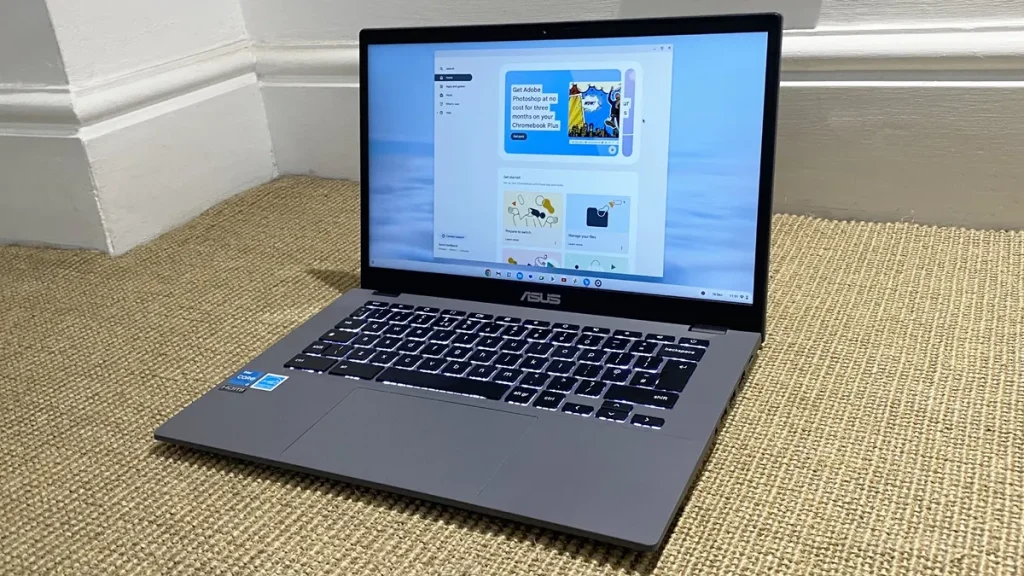
The Asus Chromebook Plus CX34 immediately gives off the impression of a laptop that was thoughtfully designed for everyday comfort. Even before diving into performance or features, it’s easy to understand why earlier versions of the CX34 were so well received. Asus focused on creating a Chromebook that feels approachable, practical, and pleasant to use on a daily basis—and for the most part, it succeeds.
Visually, the Chromebook Plus CX34 keeps the same clean and modern design language as the previous generation. The soft white finish helps it stand out from the sea of dark gray budget laptops, while the minimalist styling gives it a more refined appearance than you might expect at this price range. It looks professional enough for office or classroom use without trying too hard to appear flashy or premium.
The plastic construction also looks better than typical low-cost Chromebook materials. There’s a subtle sheen to the exterior that prevents the chassis from feeling overly cheap, and fingerprints are less noticeable than on darker finishes. Overall, Asus did a good job making the CX34 feel modern without overcomplicating the design.
That said, the build quality does reveal some compromises when you look closer. The display lid has a noticeable amount of flex if pressure is applied, especially around the bezel area. It’s not alarming for a budget laptop, but it does remind you that this is still a more affordable machine. Fortunately, the keyboard deck feels sturdier and more reassuring during everyday use. Typing feels stable, with very little creaking or flex when pressing down firmly on the center of the deck.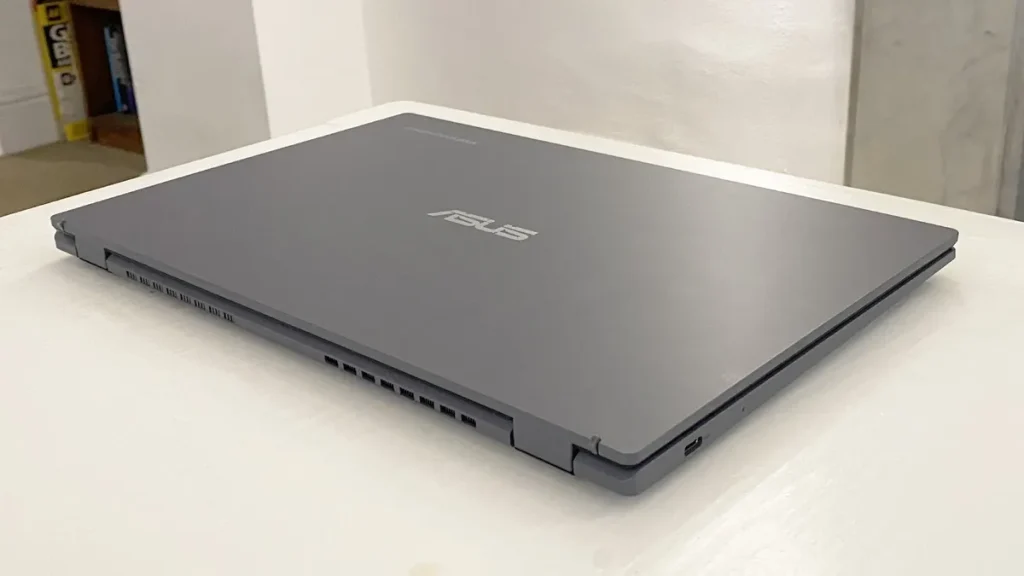
The 180-degree hinge is another welcome touch. It feels secure while opening and closing, holding the display firmly in place without being overly stiff. The flexibility to lay the screen flat can also be useful for collaborative work, presentations, or casual media viewing.
Portability is another strength of the CX34. Measuring 12.9 x 8.4 x 0.74 inches and weighing roughly 3.17 pounds (1.44kg), the laptop is easy to slip into a backpack or carry around throughout the day. It’s slightly heavier than some competing Chromebooks like the HP Chromebook Plus x360 and Acer Chromebook Spin 714, but the difference is small enough that most users are unlikely to notice during daily travel.
Overall, the Asus Chromebook Plus CX34 strikes a good balance between affordability and usability. While the chassis isn’t as rigid or premium-feeling as more expensive Chromebooks, the clean design, comfortable build, and lightweight portability make it one of the more appealing budget clamshell Chromebooks currently available.
Display, webcam, speakers
The Asus Chromebook Plus CX34 features a 14-inch 1080p display that works well for everyday computing tasks. Text appears reasonably sharp, videos look clear enough for streaming, and the panel is perfectly suitable for browsing, schoolwork, and office use. Since all Chromebook Plus models now include Full HD displays as standard, the CX34 avoids the low-resolution panels still common on some cheaper Chromebooks.
That said, this is still a fairly basic screen overall. Brightness levels are only average, and colors lack the vibrancy and depth found on more premium laptops. For general productivity and media consumption it performs adequately, but content creators or users who prioritize display quality may want something more advanced.
One welcome addition is touchscreen support. Previous versions of the CX34 lacked touch functionality, so this upgrade makes navigating ChromeOS and using Android apps feel much more natural. Simple actions like scrolling, tapping through apps, or navigating websites become more convenient with touch controls available.
The matte finish on the display also helps minimize reflections and glare, making the screen easier to use in brightly lit rooms or near windows. Outdoor visibility is still somewhat limited due to the panel’s modest brightness, but the anti-glare coating definitely improves usability.
My biggest complaint is the 16:9 aspect ratio. While still common on many laptops, it offers less vertical space than a taller 16:10 display. That extra screen height can make a noticeable difference when working on documents, spreadsheets, or web pages because there’s less scrolling involved. It’s not a dealbreaker, but productivity-focused users may notice the limitation.
The display can also fold completely flat thanks to the 180-degree hinge, giving users more flexibility when adjusting viewing angles or sharing content across a table.
Speaker quality is acceptable for a budget Chromebook, though nothing particularly impressive. Audio is clear enough for YouTube videos, casual streaming, and video calls, but the speakers lack bass and depth. At higher volumes they can sound somewhat thin, so headphones or external speakers are still the better option for music and movies.
Ports and Connectivity
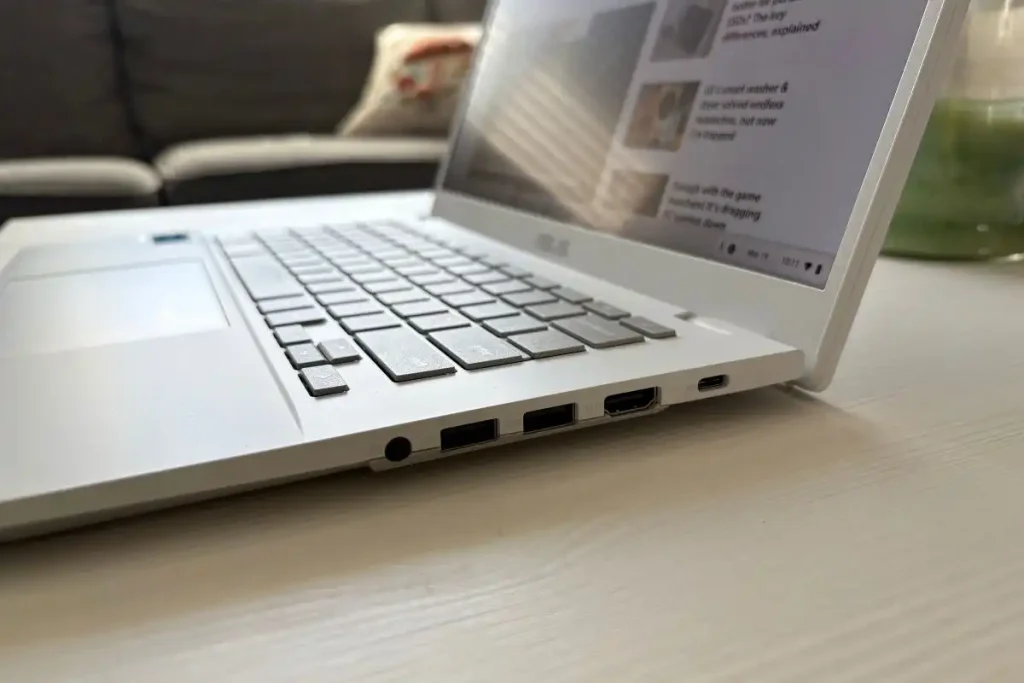
The Asus Chromebook Plus CX34 stands out in its price range for offering a very complete set of ports, which makes it easy to connect a wide variety of accessories without relying on adapters or dongles.
It includes two USB Type-A ports for older peripherals like flash drives, mice, or keyboards, along with two USB Type-C ports that handle both charging and modern device connections. One of the biggest advantages here is that the USB-C ports also support DisplayPort output, meaning you can easily connect the laptop to an external monitor for a larger workspace or dual-screen setup.
In addition, the CX34 features an HDMI 1.4 output, which provides a straightforward way to connect to TVs or monitors without needing any converters. There’s also a 3.5mm combo audio jack for headphones or headsets, covering the basics for audio input and output.
What’s missing is fairly typical for this category. There’s no built-in Ethernet port, so wired internet requires a USB adapter if needed. There’s also no microSD card slot on this model, which some competing Chromebooks—such as the Acer Chromebook Plus 514—do include for expandable storage. Rounding out the selection is a 3.5mm combo audio jack, which supports both headphones and headsets for audio playback and voice calls.
Even so, the overall port selection is stronger than many laptops in this segment, especially for users who still rely on a mix of modern USB-C devices and older USB-A accessories.
Performance
The Asus Chromebook Plus CX34 delivers solid everyday performance thanks to its Intel Core i3-1215U processor. While this isn’t a high-end chip, it’s still significantly more capable than the low-power MediaTek and Intel Celeron processors commonly found in cheaper Chromebooks. Combined with 8GB of RAM, the laptop feels responsive during normal use, handling web browsing, streaming, schoolwork, office tasks, and Android apps without much trouble.
ChromeOS itself runs very smoothly on this hardware. Opening multiple browser tabs, switching between apps, and working across Google Docs or Sheets feels quick and fluid most of the time. For the average Chromebook user, the CX34 has more than enough power for daily productivity and media consumption.
Google positions Chromebook Plus devices as being powerful enough for heavier workloads like content creation and AI-assisted tasks, but those claims should be taken with some caution. The Core i3 processor is perfectly adequate for general computing, but it lacks a dedicated AI accelerator or NPU found in newer AI-focused laptops. Most AI features available on ChromeOS are cloud-based anyway, meaning the heavy processing happens online rather than directly on the laptop itself.
The 8GB RAM configuration is suitable for moderate multitasking, though heavier users may eventually hit its limits. If you tend to keep dozens of browser tabs open simultaneously or run several Android apps at once, the upcoming 16GB configuration will likely be the better long-term option. Storage performance is also decent thanks to the UFS drive, though higher-end configurations with full SSD storage should provide faster file access and better responsiveness overall.
Speaker quality is one of the weaker parts of the experience. While the speakers get loud enough for casual use, the sound lacks depth and bass, resulting in fairly thin audio output. They’re fine for YouTube videos, meetings, or light media consumption, but headphones or external speakers will provide a much better listening experience.
Keyboard and trackpad
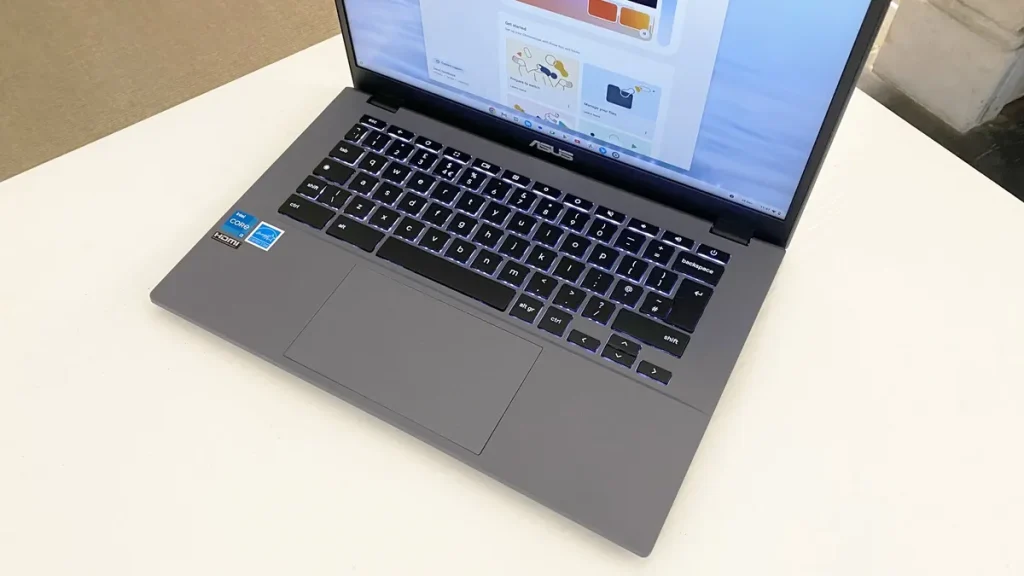
The Asus Chromebook Plus CX34 features a comfortable keyboard that works well for both casual and extended typing sessions. The keys are well spaced, offer decent travel, and have enough tactile feedback to avoid feeling soft or mushy. Typing feels responsive and consistent, making the laptop a good fit for students, writers, and office work.
The keyboard deck also feels solid during use, with very little flex when typing. Even during faster typing sessions, the chassis remains stable and comfortable.
One downside is the lack of keyboard backlighting. Previous versions of the CX34 included a backlit keyboard, so its removal is disappointing, especially for users who often work in darker environments.
The touchpad performs surprisingly well for a budget Chromebook. Measuring roughly 5 inches wide by 3 inches deep, it’s reasonably sized for a 14-inch laptop and provides enough room for comfortable navigation. Tracking is smooth and accurate, while ChromeOS gestures such as two-finger scrolling and multitasking controls respond reliably. The touchpad surface also feels smooth, allowing fingers to glide easily during use.
Asus also includes a solid 1080p webcam with a physical privacy shutter and dual-array microphones. Video quality is clear enough for meetings, online classes, and video calls, particularly in well-lit environments. ChromeOS further improves the experience with built-in features like background blur and noise cancellation that work across most video conferencing apps.
Battery Life
Battery life on the Asus Chromebook Plus CX34 is solid enough for a full day of light-to-moderate use, though it doesn’t lead the Chromebook category. In testing, the laptop lasted around 10 hours and 51 minutes on a single charge, which is a respectable result for a Chromebook powered by an Intel Core processor.
With lighter workloads and reduced screen brightness, battery life can stretch even further. However, under more realistic day-to-day conditions—such as higher brightness levels, multiple browser tabs, streaming, and Android app usage—you should expect closer to seven to eight hours of practical use before needing to recharge.
That’s still good enough for school, office work, or casual travel without constantly carrying the charger, but some competing Chromebooks offer better endurance. Devices like the Acer Chromebook Plus Spin 714 can push well beyond the 15-hour mark, making them better suited for users who prioritize maximum battery longevity above everything else.
Conclusion
The Asus Chromebook Plus CX34 is an easy Chromebook to recommend for anyone looking for a dependable everyday laptop without spending premium money. Asus made smart improvements where they matter most, adding a touchscreen display, maintaining solid overall performance with the Intel Core i3 processor, and delivering a typing and navigation experience that feels noticeably better than many competing budget Chromebooks. Combined with its clean design and generous port selection, the CX34 offers excellent overall value for students, remote workers, and casual users alike.
It’s not a perfect device, of course. The lack of keyboard backlighting feels like a step backward, the speakers are fairly average, and the 16:9 display format may disappoint users who prefer taller productivity-focused screens. Still, these drawbacks are relatively minor compared to everything the laptop gets right. For users who want a fast, practical, and well-rounded Chromebook that handles everyday tasks comfortably, the Asus Chromebook Plus CX34 remains one of the best budget clamshell Chromebooks currently available.


