Skytech Archangel Review: Gaming Desktop on a Budget
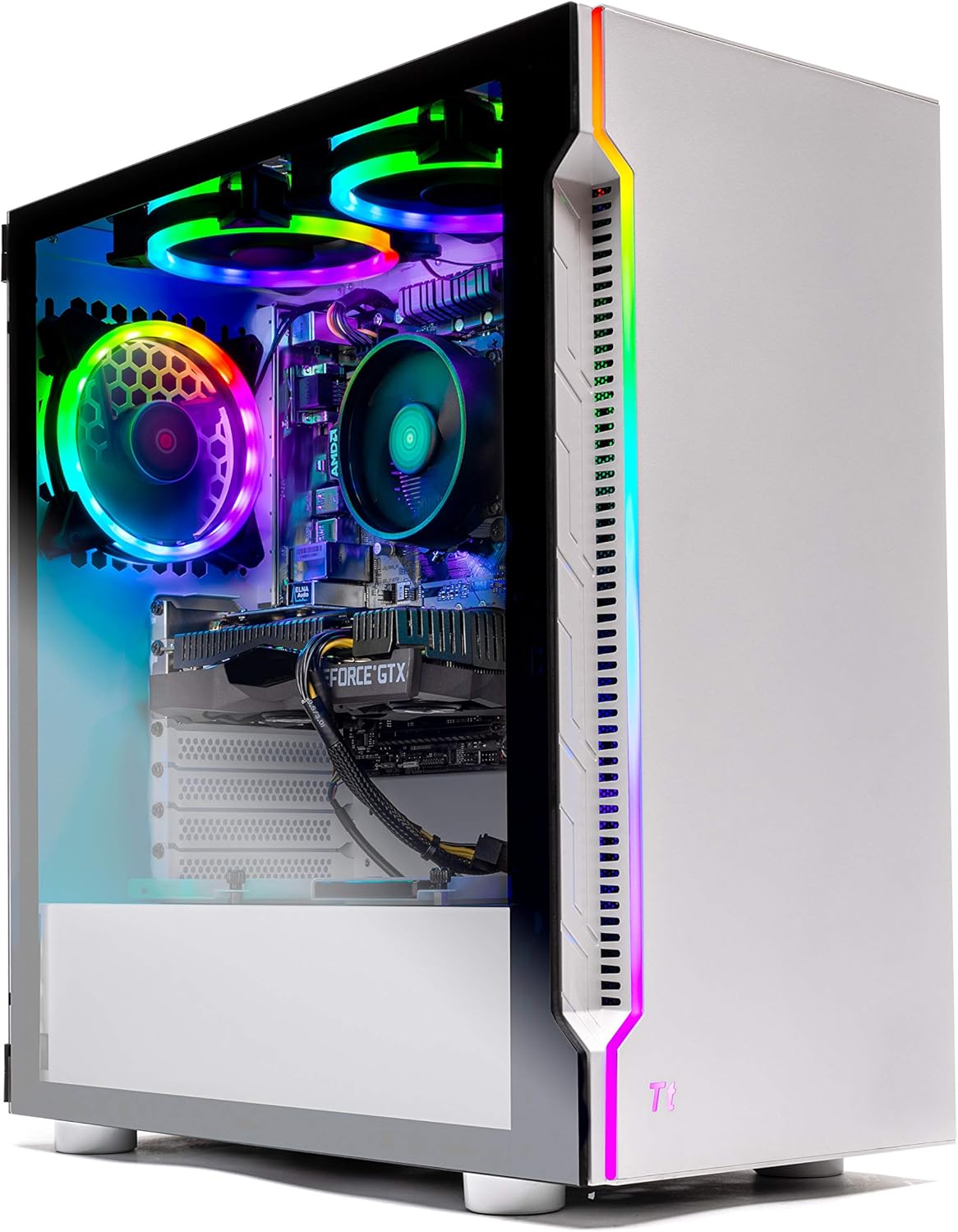
The SkyTech Archangel is your gateway to exhilarating gaming experiences! This midtower marvel boasts a potent AMD Ryzen 5 3600 and GeForce GTX 1660 card that ensures fluid 60fps plus 1080p gaming. It delivers top-tier gaming performance at a fraction of the cost compared to its competitors in the same class.
Pros
- Solid 60 fps on most 1080p gaming
- Simple design, sleek-looking case
- Clean installation and cable management
- Customizable RGB lighting
- 1 year warranty
- No bloatware
Cons
- A little too pricey
- Smaller sized motherboard
Skytech Archangel Specs
| Desktop Class | Gaming |
| Processor | AMD Ryzen 5 3600 6-Core 12-Thread 3.6GHz |
| Processor Speed | 3.6 GHz |
| RAM (as Tested) | 16GB DDR4 3000MHz |
| Boot Drive Type | SSD |
| Boot Drive Capacity (as Tested) | 500 GB SSD |
| Optical Drive | DVD+/-RW |
| Graphics Card | GeForce GTX 1660 Super 6GB GDDR6 |
| Operating System | Windows 11 Home |
Navigating the labyrinthine landscape of gaming PCs can be a daunting task, especially when you’re in search of a high-end machine at a reasonable price. Enter Skytech Gaming Desktops, a beacon of simplicity and performance in a crowded market.
In an era where building your own PC has become more accessible than ever, custom PC manufacturers are constantly pushing the envelope with unique chassis designs and technologically advanced components. The SkyTech Archangel arrives as a breath of fresh air, offering a hassle-free alternative to piecing together your own rig.
What sets the Archangel apart from the competition is its ability to blend affordability with luxury. Despite its budget-conscious positioning, this gaming tower surprises and delights with high-end touches. A sleek tempered glass window showcases the inner gaming prowess, while a trio of remote-controlled RGB-lit fans not only keeps temperatures in check but also elevates your setup aesthetics. With SkyTech, you can have it all – top-tier performance, style, and savings.
Design
In the world of gaming PC aesthetics, the Skytech Archangel stands out as a striking mid-tower with a unique twist. While most pre-built gaming rigs come in the usual black or grey metal cases, the Archangel breaks the mold with its elegant white aluminum and tempered glass chassis. The front panel’s pristine white surface adds an air of distinctiveness to the ensemble, a refreshing departure from the ordinary. Accentuating this innovation is a vertical strip adorned with vents and vibrant RGBs, effectively shattering the monotony of conventional designs.
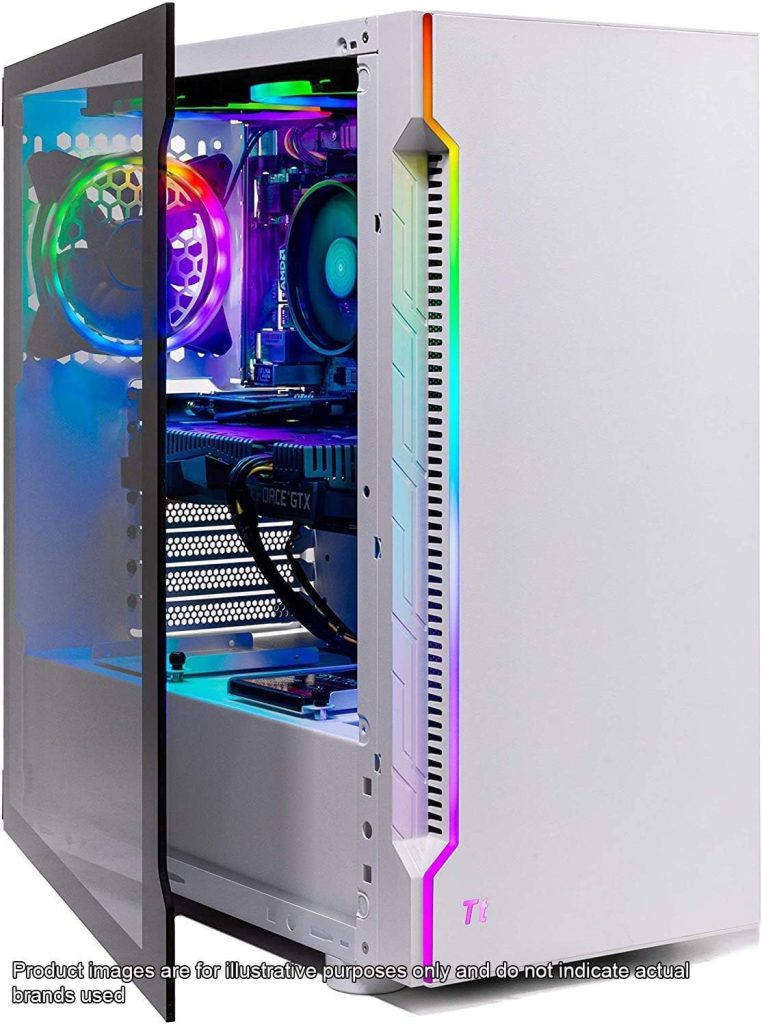
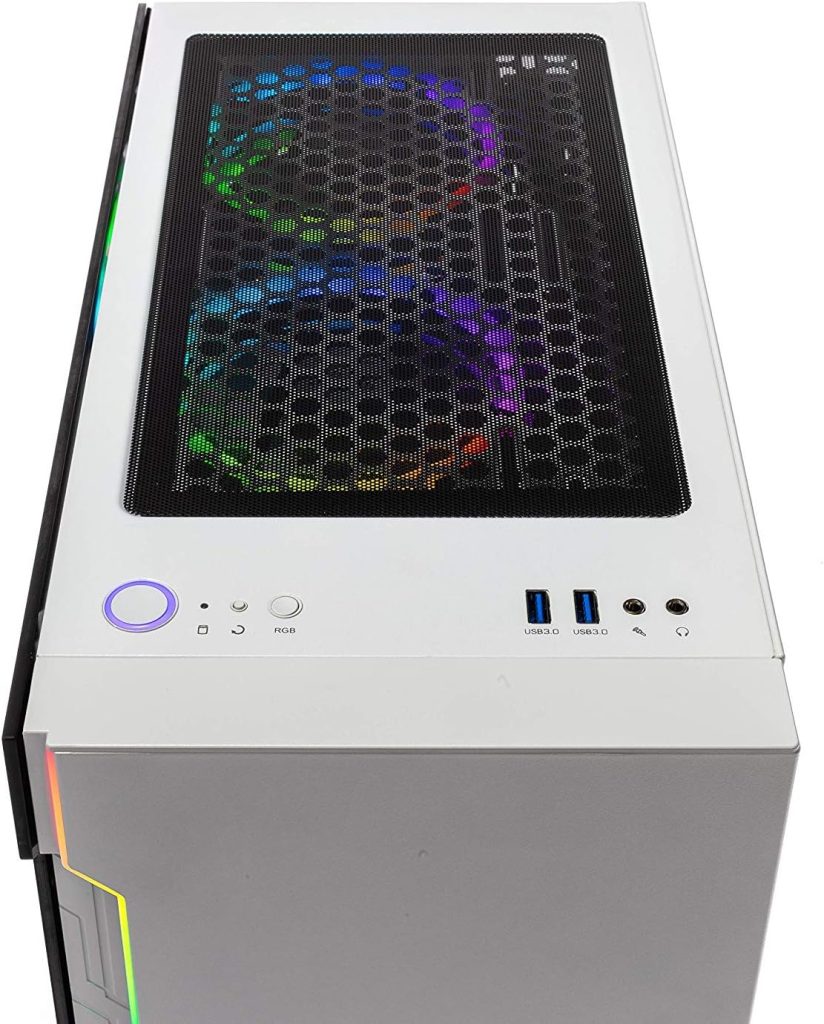
However, the Archangel balances its avant-garde front with a more conservative rear. The left side panel, constructed from tempered glass, grants you a glimpse into the inner workings of your gaming powerhouse, while the right side panel discreetly conceals cable management. On top, a magnetic dust filter provides easy access to ports, ensuring hassle-free connectivity. To maintain optimal performance, the case is equipped with two 120mm intake fans at the front and an exhaust fan at the rear, which also aids in cooling the CPU liquid cooler, ensuring that Ryzen’s heating concerns are effectively managed.
Measuring in at a balanced 17.9 x 8.3 x 16.4 inches, the Skytech Archangel strikes the ideal size for a gaming rig – neither too bulky nor too compact. This it shares with its sister, the Skyteck Azure. It radiates a gamer’s vibe without going overboard, thanks to the Thermaltake S200 case. Opening the tempered glass side panel reveals a dazzling display of RGB colors emanating from the fans and case, providing a visual treat for enthusiasts. Its versatile size allows you to place it on your desk or in a compact space, making it a versatile addition to your gaming setup.
Ports
At the forefront of convenience, the mid-tower’s front panel boasts a pair of USB 3.1 Type-A ports and dedicated headphone and microphone jacks, ensuring seamless connectivity for your gaming peripherals. While these amenities are undoubtedly handy, the absence of a USB-C port and a media card reader leaves room for improvement, enhancing the overall user experience.
Turning our attention to the rear, the motherboard equips you with a robust selection of ports, featuring five USB 3.1 ports, one USB Type-C, one HDMI, and an Ethernet jack. This comprehensive array caters to various connectivity needs, whether you’re plugging in external devices or establishing network connections. Additionally, the inclusion of headphone, line-in, and line-out audio jacks ensures your audio requirements are met with ease.
For the tech-savvy multi-monitor enthusiasts, the Nvidia GTX 1660 Ti graphics card steals the spotlight with its impressive offerings. Boasting one HDMI and three DisplayPort video-out connectors, it grants you the flexibility to set up a multi-monitor configuration with effortless precision, immersing you further into your gaming experience. As a cherry on top, the package includes a standard gaming keyboard and mouse, while the monitor is available separately, allowing you to tailor your gaming setup to your unique preferences. P/S If you want tro know which port to use on your monitor, check out the HDMI vs DisplayPort article.
Performance
In the realm of performance, the Skytech Archangel doesn’t disappoint. It houses an AMD Ryzen 5 2600X CPU, a formidable 16GB of RAM, a zippy 500GB SSD for storage, and the reliable Nvidia GTX 1660 graphics card. These specs are nothing short of impressive, especially considering this gaming powerhouse comes at a price tag under a thousand bucks. Without a doubt, it’s more than capable of handling today’s modern PC games at a crisp 1080p resolution.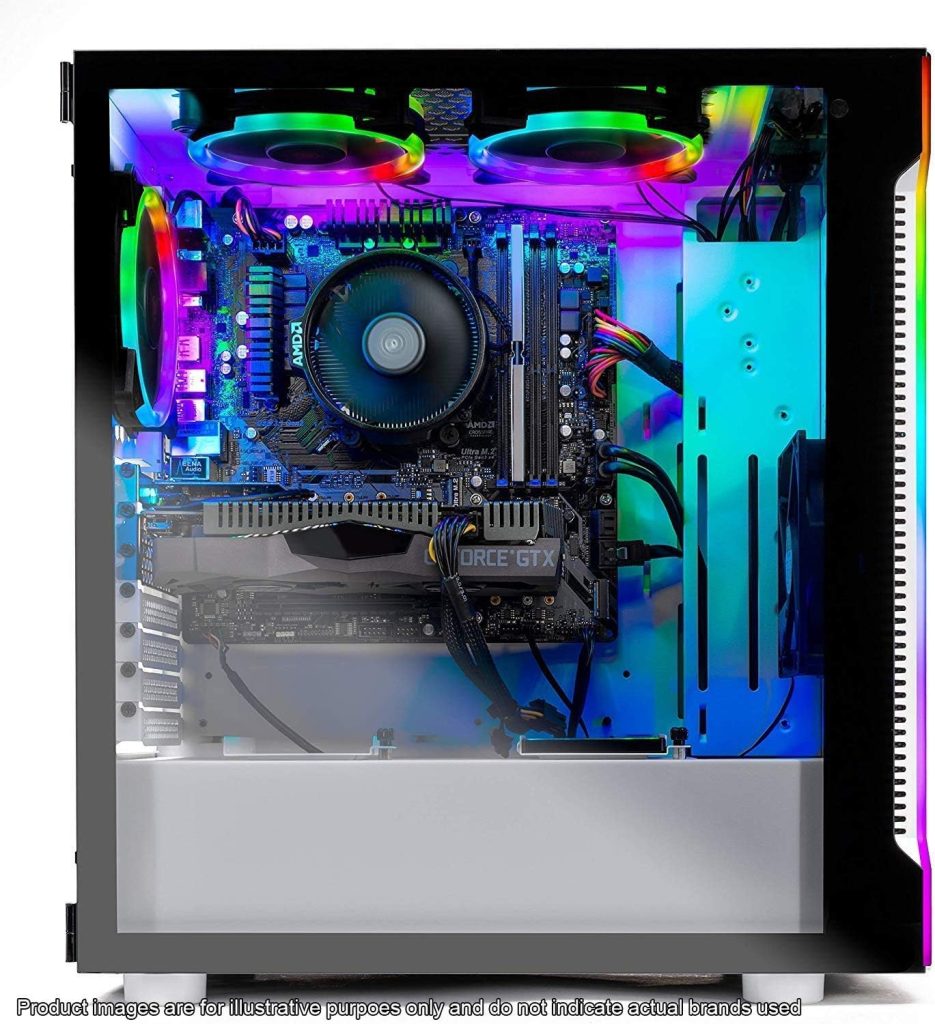
Taking Call of Duty Modern Warfare (2019) and Rage 2 (2019) as prime examples, gaming on a 1,920 x 1,080 display is a breeze, delivering smooth and immersive experiences. Even at this demanding resolution with high settings, the Archangel flaunts its prowess, easily achieving over 70 fps in the graphically intensive Shadow of the Tomb Raider (2018).
Benchmark scores for the GTX 1660 echo the same tale of excellence, delivering precisely what’s expected from the CPU. In real-world gaming scenarios, the Archangel shines with an average of 73 fps in titles like Star Wars Battlefront II, outpacing the RX 590 by nearly 18% and the 6GB GTX 1060 by an impressive 23%. While it falls short of the GTX 1070 by approximately 15%, it’s a testament to its solid gaming performance. However, if you’re eyeing 4K gaming, you may want to explore alternatives with an RTX 3080 GPU, such as the Alienware Aurora R14, albeit at a slightly higher cost.
Daily Productivity
Not limited to gaming prowess, the Skytech Archangel flexes its muscles in processing power as well. The Ryzen 5 5600X, paired with 16GB of RAM and a speedy 1TB SSD, handles processing-intensive tasks and effect-heavy applications with grace. Whether you’re into media creation or demanding editing tasks, this machine has your back, albeit sporting a gaming-centric chassis aesthetic that might not suit everyone’s taste.
Furthermore, as a VR-ready machine, the Archangel delivers stellar performance when tested with the Valve Index VR headset, ensuring that graphically demanding VR titles like Half-Life: Alyx run flawlessly. Whether you’re diving into gaming or tackling productivity, the Skytech Archangel proves to be a versatile and reliable choice in the gaming PC landscape.
Skytech Archangel Review: Conclusion
SkyTech deserves a tip of the hat for leaving no stone unturned in their offering of the Archangel gaming PC on Amazon. They’ve meticulously assembled a comprehensive package, not just in terms of hardware, but also in terms of dedicated customer support. It’s a refreshing departure from the common trend in the pre-built gaming PC industry, where flashy exteriors often conceal lackluster interiors – the heart and soul of any gaming rig.
When you scrutinize the SkyTech Archangel, considering its pricing and the current PC gaming landscape, it emerges as a genuinely capable gaming powerhouse. However, a couple of factors deserve attention. While you can save a few bucks by building a DIY rig with identical components, and other boutique builders may offer similar hardware for less, what sets the Archangel apart is its exceptional craftsmanship. It’s a testament to SkyTech’s commitment to quality.
In the end, the SkyTech Archangel shines as a fine choice. It effortlessly caters to those in search of a stylish, high-performing, and upgradable gaming PC without breaking the bank. It’s an easy recommendation, especially when you consider its competitive pricing in comparison to what the competition has to offer. With the Archangel, SkyTech has delivered a compelling package that leaves little room for hesitation in the quest for gaming excellence.
Frequently Asked Questions (FAQs)
What graphics card does Skytech Archangel use?
The Skytech Archangel typically comes equipped with an Nvidia GTX 1660 graphics card. However, it’s important to note that specific configurations may vary, and newer versions of the Archangel may use different graphics cards depending on the model and availability at the time of purchase. If you’re considering buying one, it’s a good idea to check the product listing or contact the retailer to confirm the graphics card included in the particular configuration you’re interested in.
However, our unit is equipped with the dependable GTX 1660 graphics card, known for its ability to deliver impressive gaming performance across a wide range of titles, particularly when gaming at a crisp 1080p resolution.
How much RAM does the Skytech Archangel have?
The Skytech Archangel gaming PC is outfitted with a total of 16GB of RAM. This substantial amount of memory ensures smooth multitasking and responsive performance during gaming sessions and other computing tasks. With 16GB of RAM at its disposal, the Archangel can handle demanding applications, large files, and memory-intensive games without breaking a sweat, offering a satisfying and lag-free computing experience.
Whether you’re engaging in intense gaming, content creation, or everyday computing tasks, the 16GB of RAM in the Skytech Archangel strikes a balance between affordability and performance, making it well-suited for a wide range of users seeking a capable and versatile gaming rig.
Do Skytech PCS have WIFI?
Skytech gaming PCs typically come with a wired Ethernet connection for internet connectivity. However, the specific inclusion of Wi-Fi capabilities can vary depending on the model and configuration you choose. Some Skytech PCs may include built-in Wi-Fi adapters, while others may not. When considering a Skytech PC, it’s important to check the product listing or specifications to confirm whether the particular model you’re interested in includes Wi-Fi support or if you would need to use a separate Wi-Fi adapter or card if wireless connectivity is essential for your setup.
Our review unit, the Skytech Archangel, does come with a built-in 802.11AC Wi-Fi adapter. This feature provides you with fast and reliable wireless internet connectivity, making it convenient to connect to your home network and enjoy online gaming, streaming, and web browsing without the need for additional accessories or adapters. With 802.11AC Wi-Fi support, you can experience a smooth and lag-free online gaming experience and seamless access to the internet for all your computing needs.
Is Skytech upgradable?
Yes, Skytech gaming PCs are typically designed with upgradability in mind. They often provide ample space for future upgrades, allowing users to enhance and customize their systems as needed. This can include open memory slots for adding more RAM to boost performance, as well as open HDD and SSD trays to increase storage capacity for additional games and files. Upgradability is an important consideration for many users, and Skytech aims to offer flexibility in this regard, making it easier for gamers and PC enthusiasts to adapt their systems to evolving needs and technologies.
One noteworthy aspect of Skytech gaming PCs is their commitment to clean and efficient cable management. Neat cable management not only enhances the overall aesthetics of the system but also makes the upgrade process significantly easier. When it comes time to add more RAM, upgrade storage, or make other hardware enhancements, the organized cable routing ensures that components are easily accessible, reducing the hassle and time required for upgrades.
This attention to detail in cable management not only simplifies upgrades but also aids in system maintenance and airflow, which is crucial for maintaining optimal performance and cooling efficiency. So, not only can you upgrade your Skytech gaming PC with ease, but you’ll also appreciate the clean and tidy interior when you open it up for any hardware improvements or modifications.
How long does it take to get a Skytech gaming PC?
When purchasing a Skytech gaming PC through Amazon, the delivery timeframe within the United States typically ranges from 4 to 5 days. For even faster delivery, Amazon Prime members may have the option to receive their shipment within just 1 day, contingent upon their location. This expedited shipping service can help you get your new gaming PC up and running swiftly, ensuring you can dive into your gaming adventures without unnecessary delays.
How do I change the graphics card in my Skytech gaming PC?
Changing the graphics card in your Skytech gaming PC involves several steps. Here’s a general guide to help you get started, but please keep in mind that the specific procedure can vary depending on your PC model and the graphics card you’re installing. Make sure to consult your PC’s manual and the documentation that comes with your new graphics card for detailed instructions.
- Prepare Your Workspace: Before you begin, make sure you have a clean, well-lit, and static-free workspace. Power off your PC and disconnect all cables and peripherals.
- Open the Case: Depending on your PC’s model, you may need to remove a side panel to access the internal components. Typically, this involves removing screws or using a latch mechanism. The Consult your PC’s manual for guidance.
- Locate the Existing Graphics Card: Inside your PC, find the current graphics card. It will be connected to the PCI Express slot on the motherboard and secured with screws.
- Disconnect Power: If your graphics card requires additional power connectors (often 6-pin or 8-pin PCIe power connectors), disconnect them from the old card.
- Remove the Old Graphics Card: Carefully unscrew and remove the old graphics card from the PCIe slot on the motherboard. Be gentle when handling the card to avoid damaging it or other components.
- Install the New Graphics Card: Align the new graphics card with the PCIe slot and firmly push it into place until it clicks. Secure it to the case using the appropriate screws.
- Connect Power: If your new graphics card requires additional power, connect the PCIe power connectors from your power supply to the card.
- Close the Case: Put the side panel back on your PC and secure it with screws or latches.
- Connect Cables: Reconnect all cables and peripherals, including the monitor, keyboard, and mouse.
- Power On: Power on your PC and install any necessary drivers for the new graphics card. You can typically find these drivers on the manufacturer’s website.
- Test Your PC: Run some benchmarks or play a game to ensure that the new graphics card is functioning correctly.
Remember to follow safety precautions, such as grounding yourself to prevent static discharge, and be patient and cautious throughout the process. If you’re unsure about any step or if you encounter difficulties, it’s advisable to seek assistance from a knowledgeable friend or a professional technician to avoid damaging your PC or components.
Do all Skytech PC come with mouse and keyboard?
Not all Skytech gaming PCs come with a mouse and keyboard as part of the package. Whether or not a mouse and keyboard are included can vary depending on the specific model and configuration you choose, as well as the retailer or seller from which you make your purchase.
Some Skytech PC bundles may include peripherals like a gaming mouse and keyboard, while others may offer the PC itself without these accessories, allowing you to select your preferred peripherals separately.
To determine whether a particular Skytech gaming PC includes a mouse and keyboard, it’s essential to review the product listing or specifications provided by the retailer or on the official Skytech website at the time of purchase. This way, you can ensure that you receive the components and accessories you desire with your gaming PC.
On the bright side, most Skytech desktops we’ve reviewed from Amazon do have a keyboard and mouse bundled in as part of the package.
Does Skytech use Windows?
Yes, Skytech gaming PCs typically come pre-installed with a Windows operating system. The specific version of Windows may vary depending on the model and configuration of the PC. Windows 10 was a common operating system for many gaming PCs in 2021 and prior years, but Windows 11 took over. Our reviewed unit the Skytech Archangel does have a Windows 11 Home OS.
It’s essential to check the product listing or specifications for the particular Skytech gaming PC you’re interested in to confirm the version of Windows included. Additionally, some Skytech PCs may offer the option to select your preferred operating system during the purchase process, allowing you to choose between Windows and other operating systems if available.