



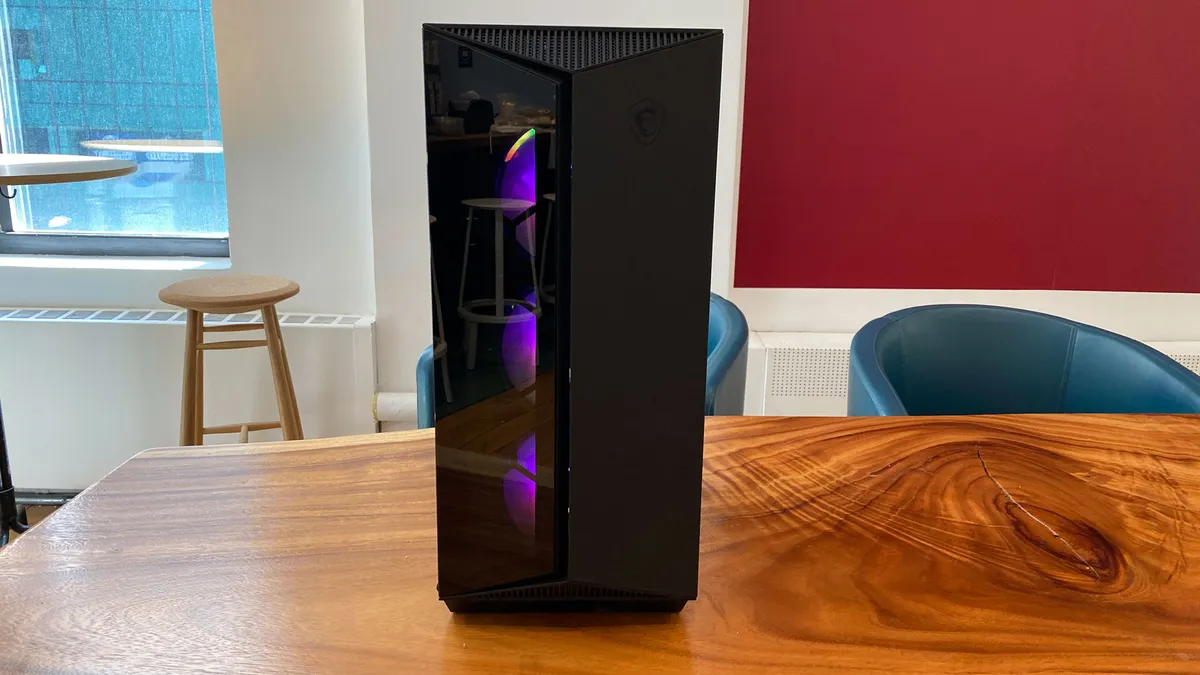
MSI Aegis ZS2 C7NVP-1435US Review: For gamers who want high-end performance without building a PC from scratch
The MSI Aegis ZS2 C7NVP-1435US stands out as a complete, no-compromise gaming setup built for serious performance. This prebuilt system packs high-end components right out of the box, combining raw power with the reliability of MSI’s in-house engineering—including its own graphics card design and efficient AIO liquid cooling solution. It’s designed for gamers who want top-tier performance without the hassle of building from scratch.
Pros
- Simple, clean design
- Powerful components
- Easily upgradeable
- Fairly priced
- Efficient liquid cooling – 360mm AIO cooler
Cons
- Limited PSU headroom for future upgrades
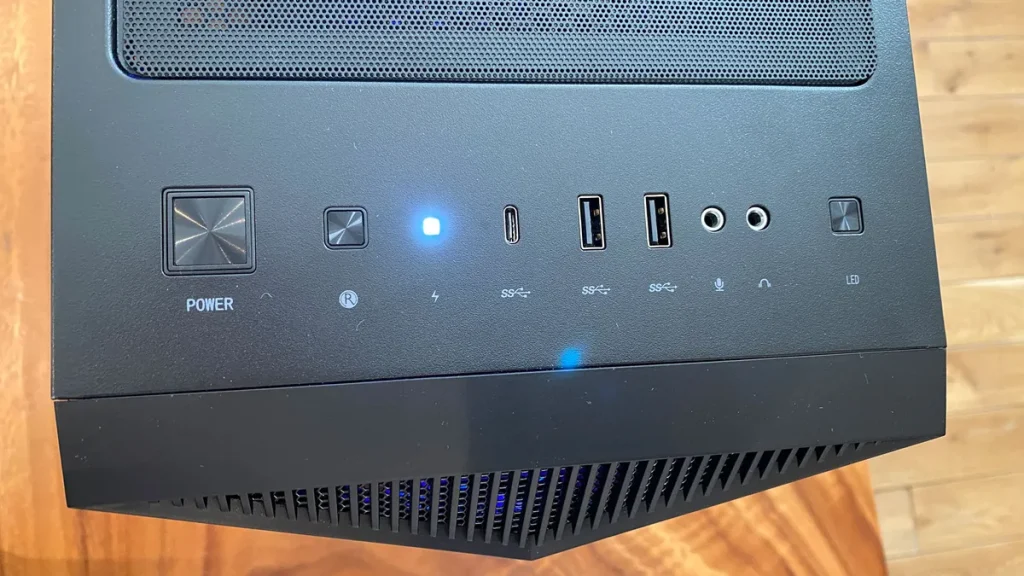
The 750W PSU is sufficient for now - No back panel ports, only top panel ports
Shopping for a prebuilt gaming PC can quickly get overwhelming. On the surface, most systems are just a collection of components inside a case—but the ones that actually stand out tend to get two things right: they use standard, upgrade-friendly parts and offer strong value for the performance you’re getting.
The MSI Aegis ZS2 C7NVP-1435US fits squarely into that conversation. Built largely around MSI’s own ecosystem, it delivers a cohesive build while still maintaining the flexibility you’d expect from a custom PC. With a AMD Ryzen 9 7900X and NVIDIA GeForce RTX 5070, plus 32GB of DDR5 memory, it’s clearly aimed at high-end gaming and heavy workloads without cutting corners.
At around the $2,000 mark, it lands in a competitive tier filled with strong alternatives. Systems like the Lenovo Legion Tower 7i—often considered one of the best overall prebuilts thanks to its balance of performance and upgradeability—set a high bar. Meanwhile, the Alienware Aurora R16 leans heavily into a more refined, compact design with a distinctive look, and the HP Omen 35L targets buyers who want solid mid-range performance closer to the $1,500 range without overspending.
Against that backdrop, the Aegis ZS2 positions itself as a well-rounded, performance-first option—not the flashiest or the cheapest, but a system that balances power, upgradeability, and price in a way that makes it easy to recommend for serious gamers
MSI Aegis ZS2 C7NVP-1435US Specs
| Processor |
AMD R9-7900X |
| RAM | 32GB DDR5 |
| Storage | 2TB M.2 NVMe SSD |
| Graphics Card | Nvidia Geforce RTX 5070Ti |
| Size | 19.4 x 9.1 x 19 inches |
| Weight | 26.9 pounds |
Design
The MSI Aegis ZS2 C7NVP-1435US doesn’t attempt a visual overhaul—instead, it refines a design MSI has already been using across its Aegis lineup. While the internal hardware sees meaningful upgrades, the exterior sticks closely to the familiar look of the MPG Gungnir 110R chassis. The front panel leans into a bold, angular style, with sharp lines and subtle geometric detailing, all centered around the signature dragon logo from MSI.
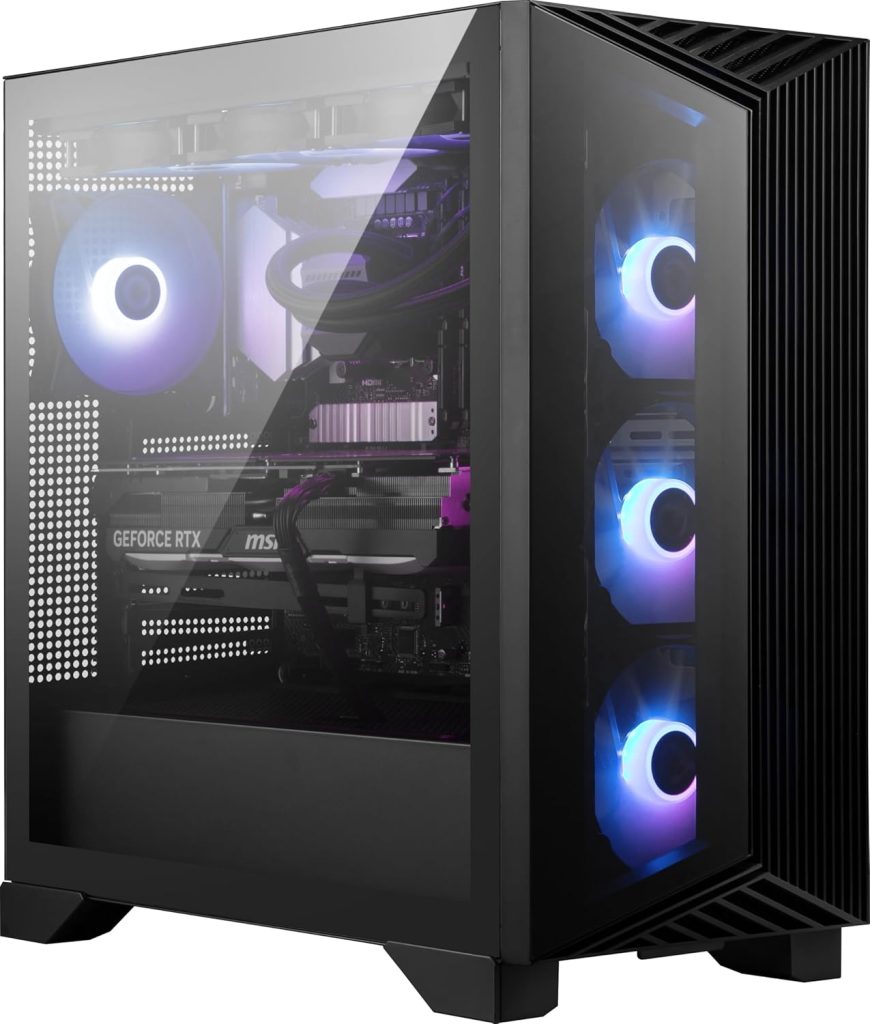
This mid-tower case combines black aluminum with tempered glass, creating a two-tone effect that gives the impression of a split design down the middle. It’s a simple but effective visual touch that adds some character without going overboard. Overall, the design strikes a nice balance—it’s clean enough to blend into most setups, yet still carries a distinct gaming identity.
In terms of size, the Aegis ZS2 strikes a middle ground. At 19.4 x 9.1 x 19 inches, it’s more compact than bulkier towers like the Lenovo Legion Tower 7i, which takes up significantly more vertical and horizontal space. At the same time, it’s noticeably larger than the more compact Alienware Aurora R16, which focuses on a tighter, more space-efficient design.
That puts the Aegis ZS2 in a practical sweet spot—it’s not overly massive, but still has enough internal room for airflow, full-sized components, and future upgrades. The trade-off is that it doesn’t feel as modern or space-conscious as some newer designs, but it makes up for that with functionality and ease of access.
Performance
For gaming, the MSI Aegis ZS2 C7NVP-1435US pairs a powerful AMD Ryzen 9 7900X with the NVIDIA GeForce RTX 5070 Ti, creating a system that comfortably handles modern AAA titles. The CPU’s 12-core, 24-thread design isn’t just strong for gaming—it also excels in productivity workloads like video editing, rendering, and content creation. Combined with the GPU, the system delivers smooth performance across modern titles, with plenty of headroom depending on resolution and settings. Beyond gaming, the graphics card also supports workloads like AI inference and other GPU-accelerated professional applications, making it more than just a gaming-focused machine.
In real-world testing across demanding titles, performance remains consistently strong. Games such as Microsoft Flight Simulator 2024 and Starfield highlight the system’s ability to handle CPU-heavy open worlds and simulation workloads, while visually demanding titles like Horizon Forbidden West and The Last of Us Part I showcase strong GPU performance and solid VRAM handling. Even more challenging Unreal Engine titles such as Hogwarts Legacy and S.T.A.L.K.E.R. 2: Heart of Chornobyl remain playable at high settings, especially when using upscaling technologies and avoiding maxed-out ray tracing. In heavier, more demanding titles like Star Wars Outlaws and A Plague Tale: Requiem, ray tracing can significantly impact performance, but DLSS support helps maintain smoother frame rates.
Overall, the Aegis ZS2 performs best as a high-end 1440p gaming system, where it consistently delivers high-quality visuals and strong frame rates across a wide range of games. At 1080p, it is more than capable of pushing extremely high frame rates, often exceeding what most displays can fully utilize.
It can also handle 4K gaming, but that experience is more selective—lighter or well-optimized titles run well at high settings, while more demanding modern releases may require reduced settings or reliance on upscaling for smoother performance. In short, this system is built around 1440p as its ideal balance point, with strong 1080p dominance and capable but less consistent 4K performance.
MSI Aegis ZS2 Vs Competition
As mentioned earlier, most gaming PCs are simply a collection of components inside a case—but the real difference comes down to how well those parts are balanced, how much performance you get for the price, and how flexible the system is for future upgrades.
The Alienware Aurora R16 (ACT1250), priced at around $2,250 from Dell, leans heavily into a polished, design-first approach. It typically comes equipped with an Intel Core Ultra 7 processor, 32GB of DDR5 RAM, a 1TB SSD, and an NVIDIA GeForce RTX 5070, supported by a high-quality 1000W Platinum-rated PSU. Performance-wise, it delivers strong 1440p gaming and solid 4K entry-level capability, but its biggest strength is its refined, compact design and quiet operation. However, it relies on more proprietary internal parts, which limits long-term upgrade flexibility compared to more standardized systems like MSI’s offering.
The Lenovo Legion Tower 7i, sits at the top of this group in terms of raw performance. With an Intel Core i9-14900KF, 32GB DDR5 RAM, a 2TB SSD, and an RTX 4080 Super, it clearly operates in a higher performance tier. This translates to significantly stronger 4K gaming performance and higher sustained frame rates in demanding modern titles. It’s widely considered one of the best overall gaming desktops because it balances top-tier performance with a more standard internal layout and strong cooling design. The trade-off is cost—it sits well above both the MSI and Alienware systems.
Against both of these, the MSI Aegis ZS2 C7NVP-1435US positions itself as the value-balanced middle ground. It doesn’t match the Legion Tower 7i in raw GPU power, and it doesn’t compete with the Aurora R16’s compact, design-focused appeal. Instead, it focuses on a practical blend of strong 1440p gaming performance, respectable 4K capability, and a more upgrade-friendly internal layout with standard components. One key difference is its 750W PSU, which is lower than the Aurora’s 1000W unit, meaning it has slightly less headroom for extreme future GPU upgrades—but still sufficient for its current configuration.
In short, the comparison breaks down clearly: the Legion Tower 7i is the performance king, the Aurora R16 is the design-focused premium compact option, and the MSI Aegis ZS2 is the best-balanced all-rounder, offering strong performance and upgradeability at a more accessible price point.
Conclusion
The MSI Aegis ZS2 C7NVP-1435US delivers a strong balance of performance, practicality, and upgrade potential. Powered by the AMD Ryzen 9 7900X and NVIDIA GeForce RTX 5070 Ti, it is built to handle modern gaming at high settings with ease, particularly at 1440p where it performs at its best. It also offers enough headroom for demanding productivity tasks such as content creation, rendering, and AI-assisted workloads, making it more than just a gaming-focused system.
Overall, this is a well-rounded prebuilt that emphasizes reliability and long-term usability. It avoids overly complex proprietary design choices in favor of more standard components, which makes future upgrades straightforward. While it may not chase extreme design innovation or flagship-level specifications, it delivers consistent, high-quality performance across today’s most demanding games, making it a solid choice for gamers who want power without unnecessary complications.
Who should buy this?
The MSI Aegis ZS2 C7NVP-1435US is best suited for gamers who want high-end performance without building a PC from scratch. With a AMD Ryzen 9 7900X and NVIDIA GeForce RTX 5070 Ti, it delivers excellent 1440p gaming performance and strong 4K capability when settings are adjusted or DLSS is used. This makes it ideal for players who want a smooth, modern AAA experience without constantly tweaking hardware or worrying about compatibility. It’s also a strong fit for users who multitask heavily—streaming, gaming, and running creative apps like video editors or 3D software at the same time.
It’s also a great choice for content creators and hybrid users who need more than just gaming power. The Ryzen 9 CPU provides workstation-level performance for rendering, editing, and productivity workloads, while the RTX GPU supports acceleration in creative tools and even AI-related applications. On top of that, the system’s more standardized design and upgrade-friendly layout make it appealing for users who want a prebuilt but still plan to improve or expand their setup over time.
However, it’s not the best fit for everyone. If you’re purely chasing maximum 4K ultra performance at any cost, or want the absolute cheapest way to get similar performance, there are either higher-tier systems or custom builds that may suit you better. But for most gamers, especially those targeting high-quality 1440p gaming with future upgrade potential, this system hits a very practical sweet spot.
FAQs
Is the MSI Aegis ZS2 upgradeable?
Yes, the MSI Aegis ZS2 C7NVP-1435US is designed to be highly upgradeable compared to many modern prebuilts. MSI uses mostly standardized desktop components rather than heavily proprietary parts, making future upgrades and repairs much easier. Many of the internal components are also part of MSI’s own ecosystem, while other hardware—such as the RAM and power supply—comes from established brands like XPG.
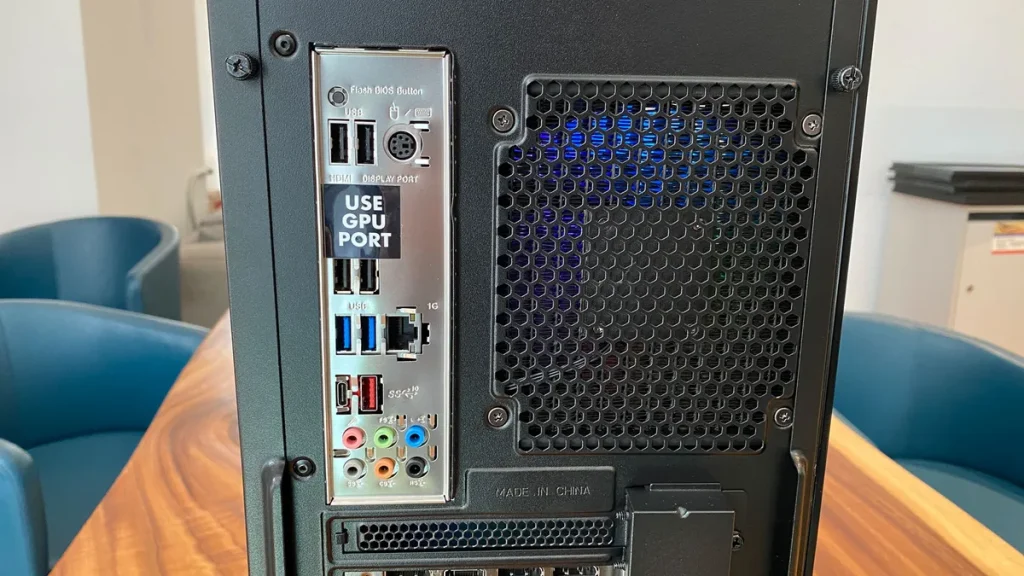
One thoughtful detail is MSI’s large “USE GPU PORT” sticker covering the motherboard’s HDMI and DisplayPort outputs. Since the Ryzen processor used in this system does not rely on integrated graphics, users must connect their monitor directly to the graphics card for video output. It’s a small but practical touch that helps prevent setup confusion for first-time PC buyers.
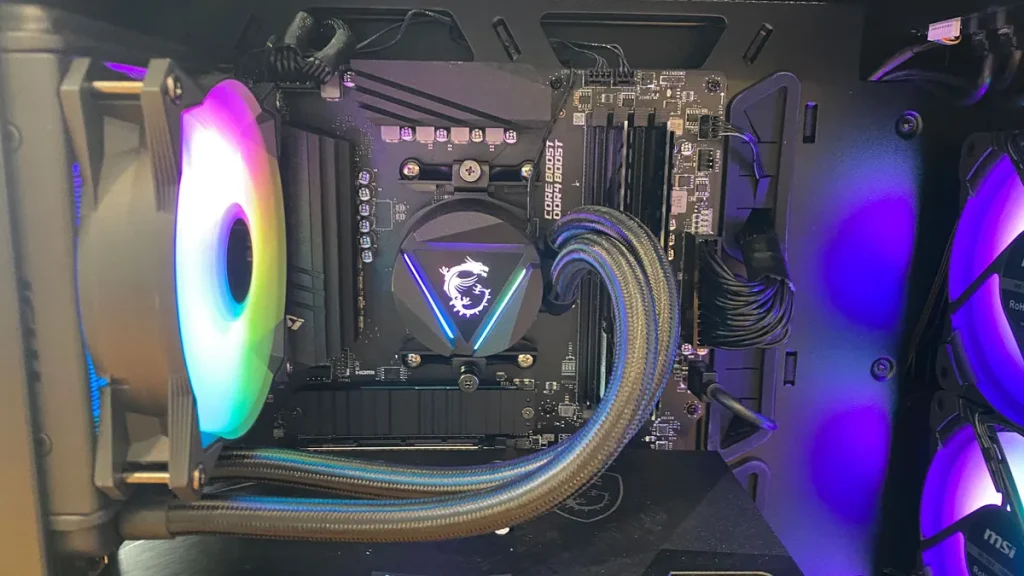
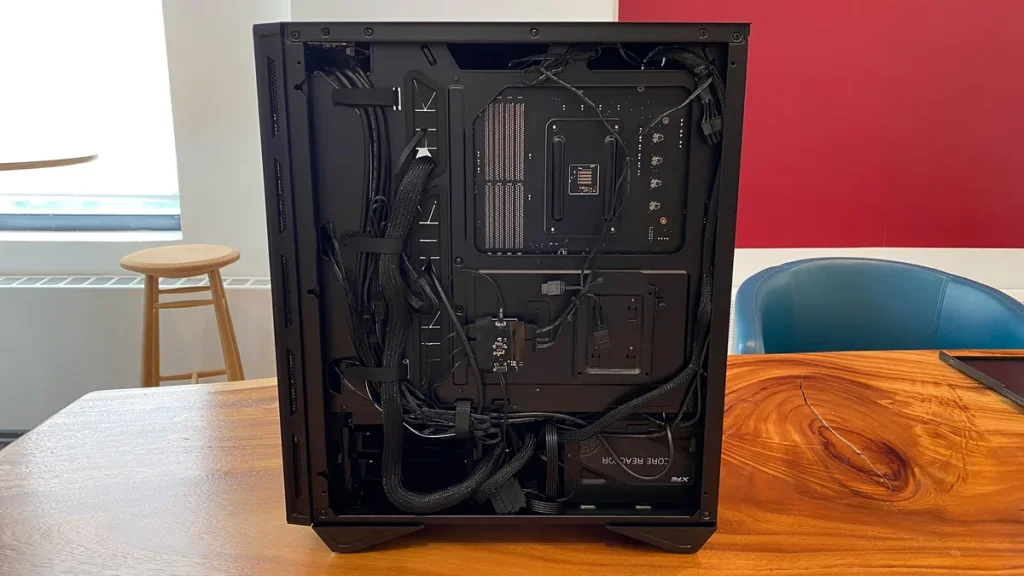
Accessing the internals is simple. Both the tempered glass side panel and aluminum rear panel are secured using thumb screws and include built-in handles, allowing the panels to slide off easily without tools. Once inside, there’s plenty of room to work with. Upgrading the RAM or replacing the NVMe SSD can be done fairly easily, although temporarily removing the GPU may provide additional clearance during installation.
Storage expansion is also straightforward. Behind the PSU shroud, MSI includes a dedicated drive sled for installing additional 2.5-inch SSDs or HDDs, giving users extra flexibility for expanding game libraries or media storage over time.
Cable management is neatly organized behind the motherboard tray, helping maintain strong airflow while also making future upgrades less frustrating. The only real limitation is the included 750W power supply. It’s perfectly adequate for the current Ryzen 9 7900X and RTX 5070 Ti configuration, but users planning major future GPU upgrades may eventually want a higher-wattage PSU for additional headroom.
Is the MSI Aegis ZS2 good for gaming?
Absolutely. The MSI Aegis ZS2 is built specifically for high-end gaming and performs exceptionally well at 1440p resolution, where it delivers high frame rates and excellent visual quality across modern AAA games. With its AMD Ryzen 9 7900X processor and NVIDIA GeForce RTX 5070 Ti graphics card, the system has more than enough power for demanding titles such as Starfield, Hogwarts Legacy, Microsoft Flight Simulator 2024, and The Last of Us Part I.
At 1080p, the system easily pushes extremely high frame rates suitable for competitive gaming and high-refresh-rate monitors. It’s also capable of 4K gaming, though the most demanding modern titles may require DLSS or slightly reduced settings for the smoothest experience.
Beyond gaming, the hardware also handles streaming, multitasking, content creation, video editing, and AI-assisted workloads very well. Combined with its efficient 360mm liquid cooling system and strong airflow design, the Aegis ZS2 remains cool and stable even during long gaming sessions.
What operating system does the MSI Aegis ZS2 use?
The MSI Aegis ZS2 C7NVP-1435US comes preinstalled with Windows 11 Home. The operating system is fully activated out of the box and includes support for modern gaming technologies such as DirectStorage, Auto HDR, and the latest driver optimizations for NVIDIA GeForce graphics cards.


